The Ultimate AI Gateway: Switch Models Instantly with Synaplan
The AI landscape is moving at breakneck speed. New models are released weekly, pricing structures change without warning, and API outages can bring your entire application to a halt. Tying your infrastructure to a single provider is no longer just a technical debt—it is a business risk.
Enter the AI Gateway.
An AI Gateway acts as a unified control plane between your applications and the various AI models on the market. Instead of hardcoding vendor-specific SDKs into your codebase, your applications talk to the gateway. The gateway then routes, logs, and manages the requests to the underlying providers.
Synaplan ships with a powerful, built-in AI Gateway designed to give you complete control over your AI infrastructure.
Why You Need an AI Gateway
When you connect directly to an AI provider like OpenAI or Anthropic, you inherit their limitations. If their API goes down, your app goes down. If they raise prices, your costs increase. If a competitor releases a faster, cheaper model, you have to rewrite your integration code to take advantage of it.
An AI Gateway abstracts away these complexities. It provides a single, standardized API endpoint for your applications, while handling the messy details of provider-specific formatting, authentication, and error handling behind the scenes.
Switch Models Instantly via Config
With Synaplan's AI Gateway, switching models is no longer a developer task. It is a configuration change.
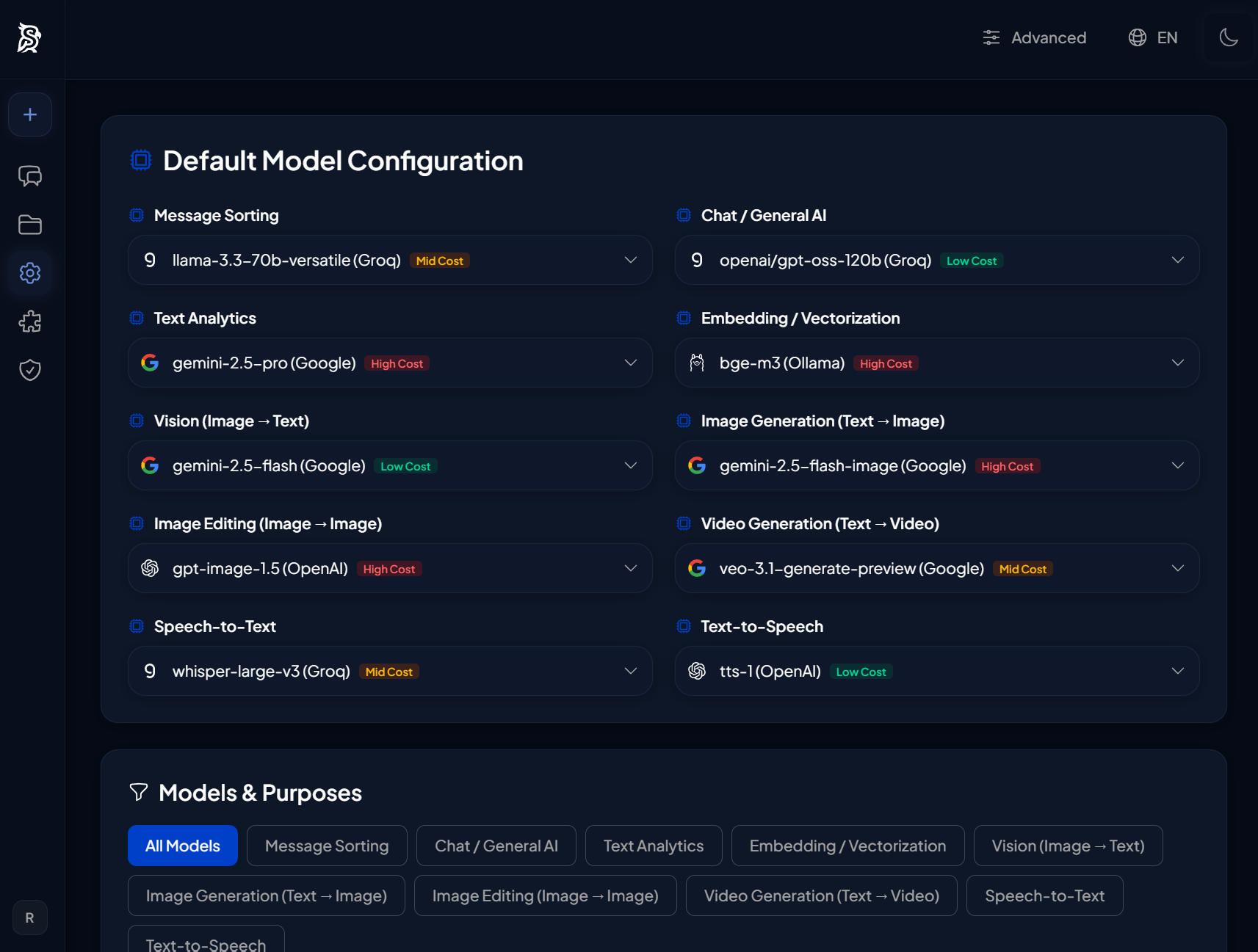
Through the Synaplan administration interface, you can easily configure multiple AI providers—whether it is cloud APIs like OpenAI, Google Gemini, Anthropic, Groq, and Mistral, or local models running via Ollama.
You can map specific use cases to specific models. For example:
- Complex reasoning tasks can be routed to a heavy model like GPT-4o or Claude 3.5 Sonnet.
- Fast, high-volume tasks (like summarization or data extraction) can be routed to a cheaper, faster model like Llama 3 or Mistral.
- Highly sensitive data processing can be routed exclusively to self-hosted local models.
All of this happens without changing a single line of code in your frontend applications or chat widgets.
Automatic Routing and Fallbacks
A robust AI Gateway doesn't just let you switch models manually; it handles failures automatically.
If your primary AI provider experiences an outage or rate-limits your requests, the Synaplan AI Gateway can automatically failover to a backup provider. This ensures your users never see an error message just because a third-party API is having a bad day.
You can configure fallback chains: if Provider A fails, try Provider B, and if that fails, fall back to a local model. This guarantees maximum uptime and reliability for your AI features.
Centralized Audit Logging and Cost Control
When multiple teams are using different AI models across your organization, tracking usage and costs becomes a nightmare.
An AI Gateway solves this by centralizing all traffic. Every prompt, every response, and every token is logged in one place. Synaplan provides full audit trails, allowing you to see exactly who is using which models, what data is being sent, and how much it is costing you.
You can set rate limits, enforce budgets per team, and ensure compliance with data privacy regulations—all from a single dashboard.
Future-Proof Your AI Strategy
The best AI model today might not be the best one tomorrow. By implementing an AI Gateway with Synaplan, you decouple your applications from the underlying AI providers.
You gain the flexibility to adopt new models the day they are released, the reliability of automatic fallbacks, and the security of centralized logging. Stop rewriting your integrations, and start managing your AI infrastructure like a pro.