Synaplan 5: Self-Hosted AI, Two-File Install, Frontier Models Weekly
Synaplan 5.x is the new stable line of our open-source AI platform. From 5.0.0 on 20 September to 5.1.2 today we have shipped eleven releases, and the pace is the point: Synaplan now gets updates every week, so a self-hosted install carries the same frontier models and the same features as the cloud at web.synaplan.com.
Three things define the 5.x line. The install got simpler, the AI gained a compute space to work on your files, and the model catalog keeps itself current. Below that: the absolute highlights of the last ten days.
Install from two files
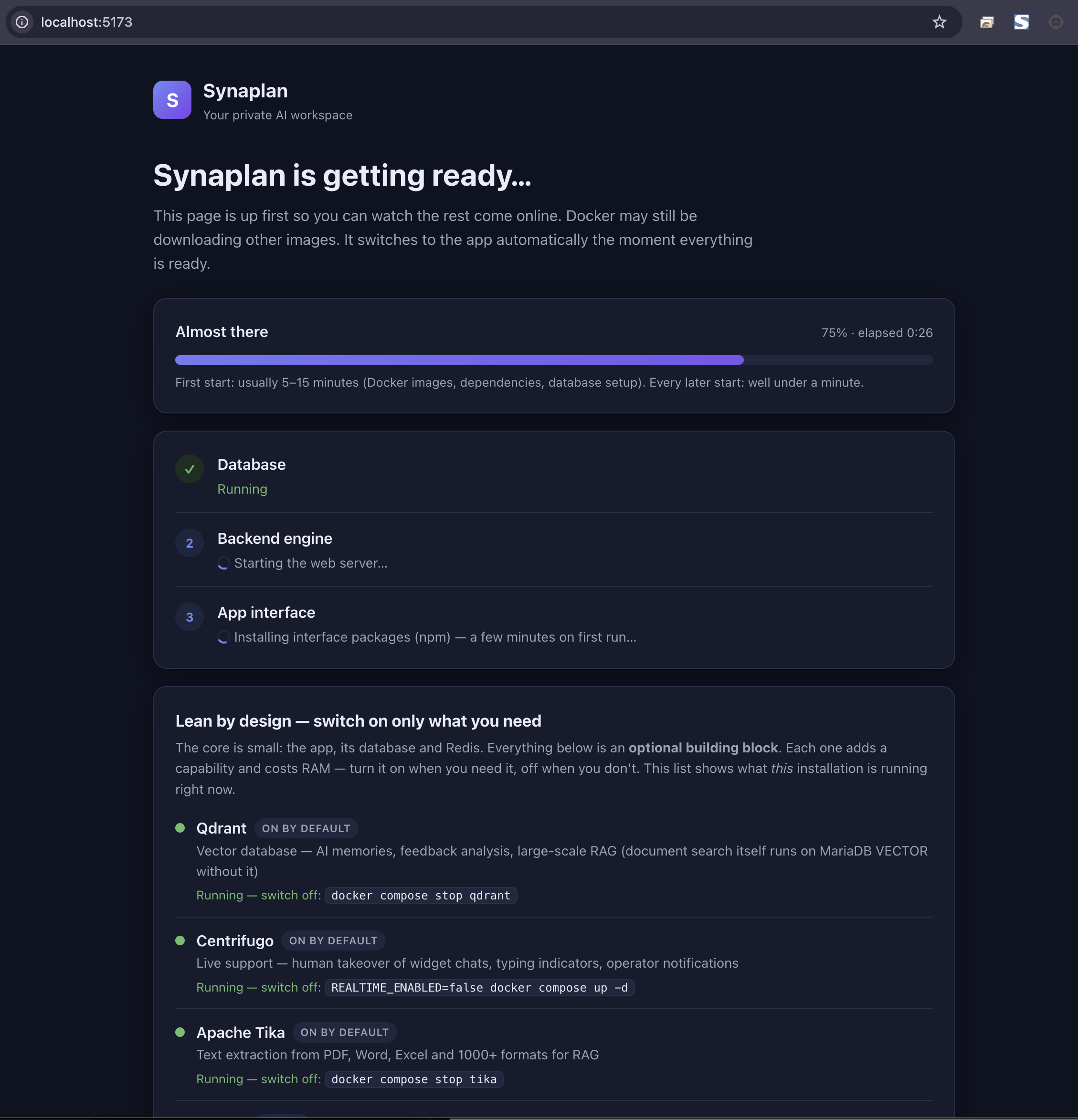
The screenshot at the top is what you see seconds after you start Synaplan: a status page that lists every boot step, shows which optional building blocks this installation runs, and switches to the app the moment everything is ready. No more watching Docker logs to find out whether it is still pulling images.
Published image, no git checkout. Download compose.yaml and .env, start:
mkdir synaplan && cd synaplan
curl -fsSL -o compose.yaml https://raw.githubusercontent.com/metadist/synaplan/main/deploy/compose.yaml
curl -fsSL -o .env https://raw.githubusercontent.com/metadist/synaplan/main/deploy/selfhost.env.example
docker compose up -d
Open http://127.0.0.1:8000. The first start generates the eight secrets the stack needs and writes them to data/secrets.env — no shared placeholder passwords, and an example placeholder is refused before a database is created. SYNAPLAN_VERSION pins a release tag; upgrading means changing that one line and running docker compose up -d again. A Docker GUI uses the same pair: paste the compose file, select the .env.
From source. git clone, make up, open http://localhost:5173. The status page above appears within seconds; the first start takes 5–15 minutes, every later start well under a minute.
On a server. install.sh --mode server --domain https://ai.example.com writes the env, pins the latest release, and runs prepare → pull → validate → start → smoke test. New in 5.x: an opt-in local TLS proxy for closed networks — a LAN with no route to the internet gets https://10.0.0.15/ with a certificate the machine creates itself.
Lean by design: the core is the app, its database and Redis. Everything else — Qdrant, Centrifugo, Tika, Collabora, Docling, SearXNG, local Ollama, spoken answers, file work — is a building block you switch on when you need it and off when you don't. The status page and Operate → System status show which blocks your install is running right now.
A compute space for your files
Ask Synaplan for a chart from a CSV, a merged spreadsheet, or a renamed folder of PDFs, and the assistant writes a short Python or Node program and runs it — on copies of the files you picked, in an isolated sidecar, with the result handed back as files in the chat. A "Working with your file" card shows the progress; "Re-run with changes" lets you steer the next attempt in plain words.
With make up the compute space starts automatically. A production self-host adds compute to COMPOSE_PROFILES; the cloud runs it on a separate gVisor box. The app never talks to Docker, and the program never touches your originals. Details: docs.synaplan.com/modules/compute.
New frontier models, within the week
In the last ten days the catalog gained Claude Opus 5.5 and Claude Sonnet 5.5, GPT-6 Sol, GPT-6 Luna and GPT-6.1 Sol, Grok 4.7, and Meta's Muse Spark 1.3. What makes that sustainable week after week:
- Discovery is automatic. Synaplan reads the providers' own model lists every hour and reports a new id to our team within the hour it appears — with a Monday reminder for anything not yet in the catalog.
- Retirements point to a successor. When a provider sunsets a model (this week: GPT-5.4 nano, ahead of its April 2027 shutdown), the catalog records the successor and every install is switched over on the next update. No silent dead model.
- Prices are checked, not guessed. Cache and long-context rates are compared against LiteLLM's public price table; a drift fails the check before it reaches you.
Two things you will see in the chat: models that publish discrete reasoning efforts now show a reasoning level picker right on the open chat (clamped to what the model accepts), and replies stream in as they arrive and name the model that is actually answering.
Highlights of the last ten days
Eleven releases, more than 130 commits. The ones you will notice:
- Telegram as a channel. Every user can pair their own Telegram bot. Photos, documents, voice notes, video — the bot handles what the web chat handles, replies in your language, and keeps files on the answer.
- Smart Search. One palette (⌘K / Ctrl+K) searches pages, files, chats and settings. A semantic tier understands plain-word questions, and "Ask in chat" sends the question straight to your model.
- Run on this computer. With Synaplan Desktop paired, the composer lists each connected computer and the skills it reported — pick both, go.
- Meeting notes for openDesk. A default-off sidecar captions Jitsi meetings and transcribes Element voice messages through Synaplan speech-to-text; the transcript is the only artefact it stores.
- Open a server to partners. The first building block of Synaplan Federation: an administrator can open an instance to partner servers.
- Higher-contrast themes. Light and dark gained 10–15 % contrast, Operate → Branding has a one-click style reset, and every AI setting now lives on one page, AI infrastructure.
- Honest chat. Web search runs only when the question needs current information, and its results fold by default. A cut-off thinking-model reply is rejected instead of shown. A spoken reply that could not be created says so.
- Claude Code backend. The Anthropic-compatible Messages gateway streams answers, keeps interrupted turns, and returns a clean 403 when the provider key is missing.
- Your account. Change your sign-in email, pick from every timezone, and the account language follows the app language.
Get Synaplan 5
- Self-host: github.com/metadist/synaplan — Apache-2.0, two files,
docker compose up -d - Releases and notes: github.com/metadist/synaplan/releases
- Cloud, same software: web.synaplan.com
- Docs: docs.synaplan.com
Updates ship weekly. Pin a release tag, back up ./data, change one line, docker compose up -d.