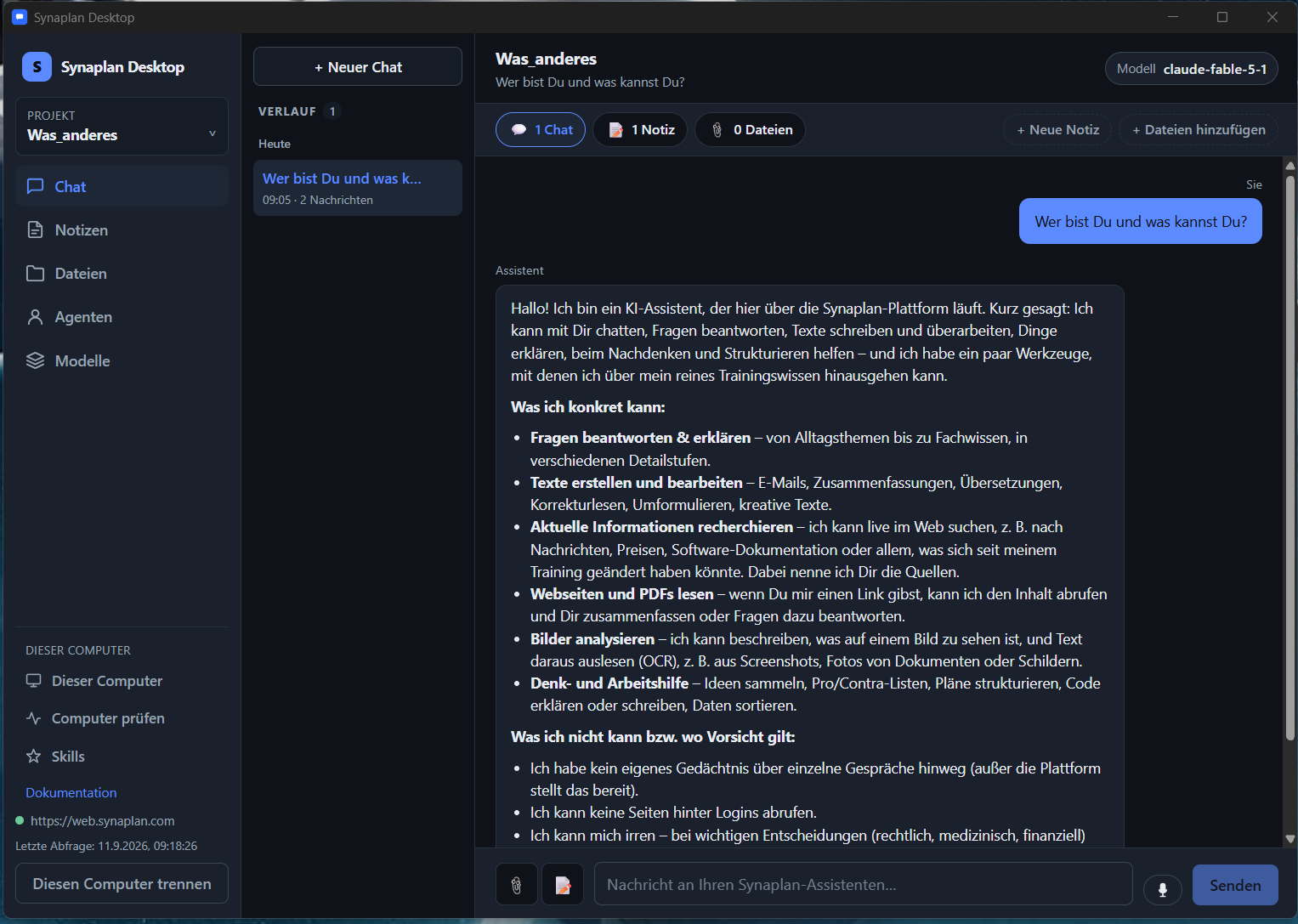
Meet Synaplan Desktop: an open-source agent runner on your computer
Synaplan now has a desktop client. It is a platform-agnostic, open-source agent runner for Windows, macOS and Linux. You pair it with the Synaplan workspace you already use — cloud or self-hosted — and you run agents on the computer in front of you.
It is not the website stuffed into a window. It is a small native app: you pick the models for a project, you gather data on this machine, and you turn agents on where they help. What should stay local stays local. The AI power still comes from Synaplan.
The source is public: github.com/metadist/synaplan-desktop. New releases are landing in the coming hours so everyday use feels smoother.
What it is
Synaplan Desktop connects this computer to your Synaplan account.
After pairing, chat uses the same assistant and the same models you already configured. There is no second AI subscription and no extra vendor dashboard. The key lives in the operating system’s secret store (Windows Credential Manager, macOS Keychain, Linux Secret Service) — not in a config file. You can disconnect the computer from the web app at any time.
That is the whole idea: one open-source runner, every common desktop OS, your workspace, your rules.
You choose the models
Each project has its own model set. You decide which world the work lives in.
- Sovereign — local or self-hosted models, for example Ollama on your machine or in your data centre.
- The collection you prefer — the cloud models your Synaplan workspace already offers.
Chat, dictation and file indexing follow those picks. Data from this project is processed only by the models you chose for it.
Local where it matters, online where it helps
A project keeps the pieces together:
- Chat — talk to your Synaplan assistant in a native window.
- Notes — Markdown on this computer. They do not leave the machine unless you share them.
- Files — add documents to the project’s knowledge folder. Synaplan indexes them with the model you picked, so the assistant can use them.
- Agents — assistants from your workspace, plus skills that run here.
- Models — the switchboard for that project.
So you can keep meeting notes and drafts on disk, and still use Synaplan’s routing, knowledge and models for the hard part. Local context stays local. Online AI stays a tool you called, not a place that swallowed the project.
What the app can do
Out of the box you can:
- Pair any Windows, macOS or Linux machine with Synaplan (a few clicks under Channels → Desktop).
- Create projects and switch between them.
- Chat, write notes, and dictate.
- Add files the assistant may read.
- Enable or disable skills per project.
- Check this computer for Python, Node and LibreOffice — the tools local skills are allowed to use.
- Start the app with your session and let it sit in the tray so queued jobs can run.
Bundled skills already create useful files on this computer, for example:
- a short profile of a CSV
- an unsent email draft for Outlook, Apple Mail or Thunderbird
- a one-page HTML report or a small slide deck
- a chart or a searchable table
- a calendar invite, a contact card, or a print-ready invoice
Results land in a folder on this computer. You open them, edit them, and send them yourself.
Claude Code agents from GitHub — with your Ollama models
A lot of Agent Skills on GitHub were written for Claude Code. They are just a folder: a SKILL.md plus a few scripts.
In Synaplan Desktop you install them from a folder, a zip, or a GitHub address. You review the file list, then you turn the skill on for a project.
The skill runs on this computer. The model behind the chat is the one you picked — including your own Ollama models through Synaplan. You do not need a second vendor account to try a skill someone published on GitHub.
Skills that expect a free command line or an open network connection are refused. That is intentional. You get the useful agents. You do not give a random folder the keys to the machine.
Open source, and moving fast
Synaplan Desktop is Apache License 2.0. The app, the bundled skills and the docs are public.
We are shipping new releases in the coming hours for a smoother install and a calmer day-to-day. If you want the newest build, watch the repository.
How to start
- In Synaplan, open Channels → Desktop and choose Pair this computer.
- In the app, enter your Synaplan address and the short code.
- Create a project, pick your models, add a little local context, and switch on the agents you need.
Docs: docs.synaplan.com/desktop Source: github.com/metadist/synaplan-desktop Workspace: web.synaplan.com