Free MCP Server Included: How MCP Calls in DAG Routing Enrich Your Prompts
An AI assistant is only as good as the context it answers from. Documents and memories get you far – but the freshest data usually lives somewhere else: in a CRM, a wiki, an internal API. With our latest release, Synaplan closes that gap using the Model Context Protocol (MCP): you connect your MCP servers once, and the AI pulls live data from them upfront, while routing your request – before a single word of the answer is written.
If you'd rather watch than read: here's the one-minute demo on YouTube.
MCP in one paragraph
MCP is an open standard that lets AI applications discover and call external tools through a single endpoint. Instead of writing glue code for every integration, the client asks a server "what can you do?" and gets a machine-readable list of tools back: a knowledge-base search, a customer lookup, a wiki query. Anthropic, OpenAI, Cursor, VS Code and a fast-growing ecosystem have adopted the standard – there's a good chance your internal systems already speak it.
Connect your own servers
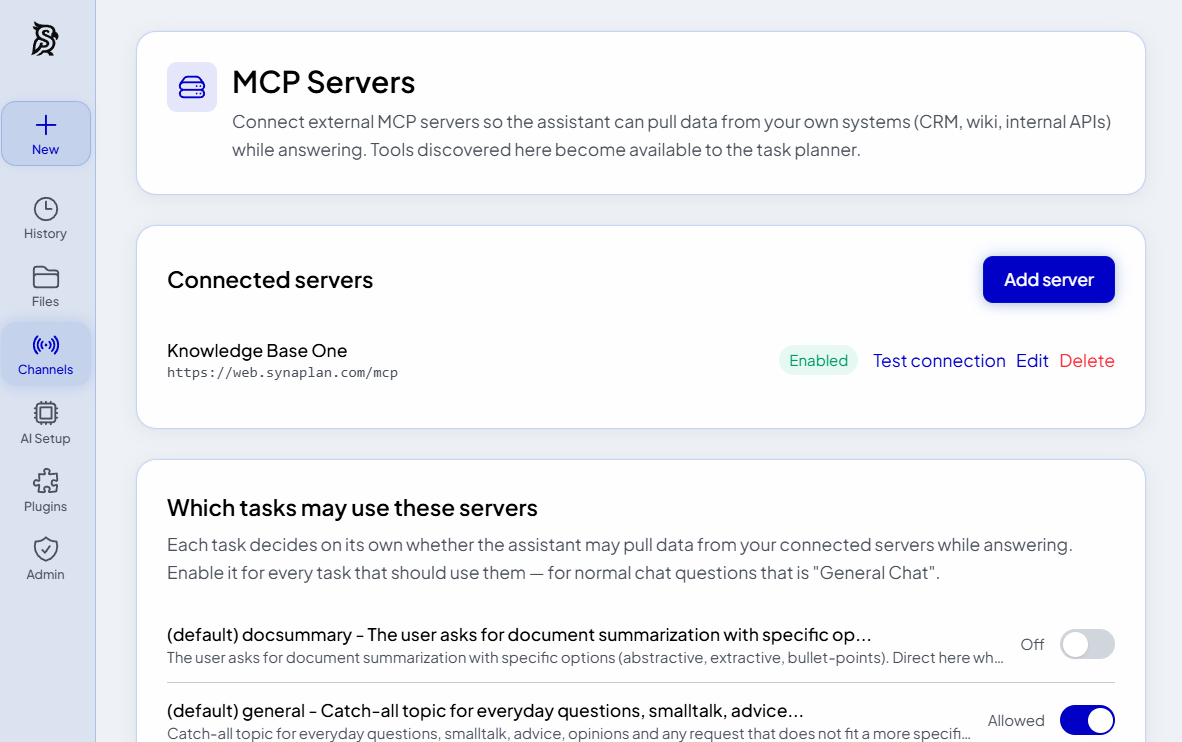
In Synaplan, open Channels → MCP Servers and add a connection: a name, the HTTPS URL, and optionally an auth header with an API key (stored encrypted, never shown again). Pick a simple name you'll remember – you can address the server directly in your prompt, just like in the demo video.
One deliberate design decision: connecting a server does nothing by itself. Each task type in your AI setup decides on its own whether it may pull data from your servers – for everyday questions that's the "General Chat" task. That way an MCP source never leaks into a task where you don't want it.
What happens when you prompt
This is where DAG routing comes in – the planning engine we introduced in one prompt, a whole plan. When your message calls for it, a planner model drafts a small graph of steps and Synaplan executes them in order.
The new part: the planner now sees the tools of your connected MCP servers in its catalog. Take the request from the video:
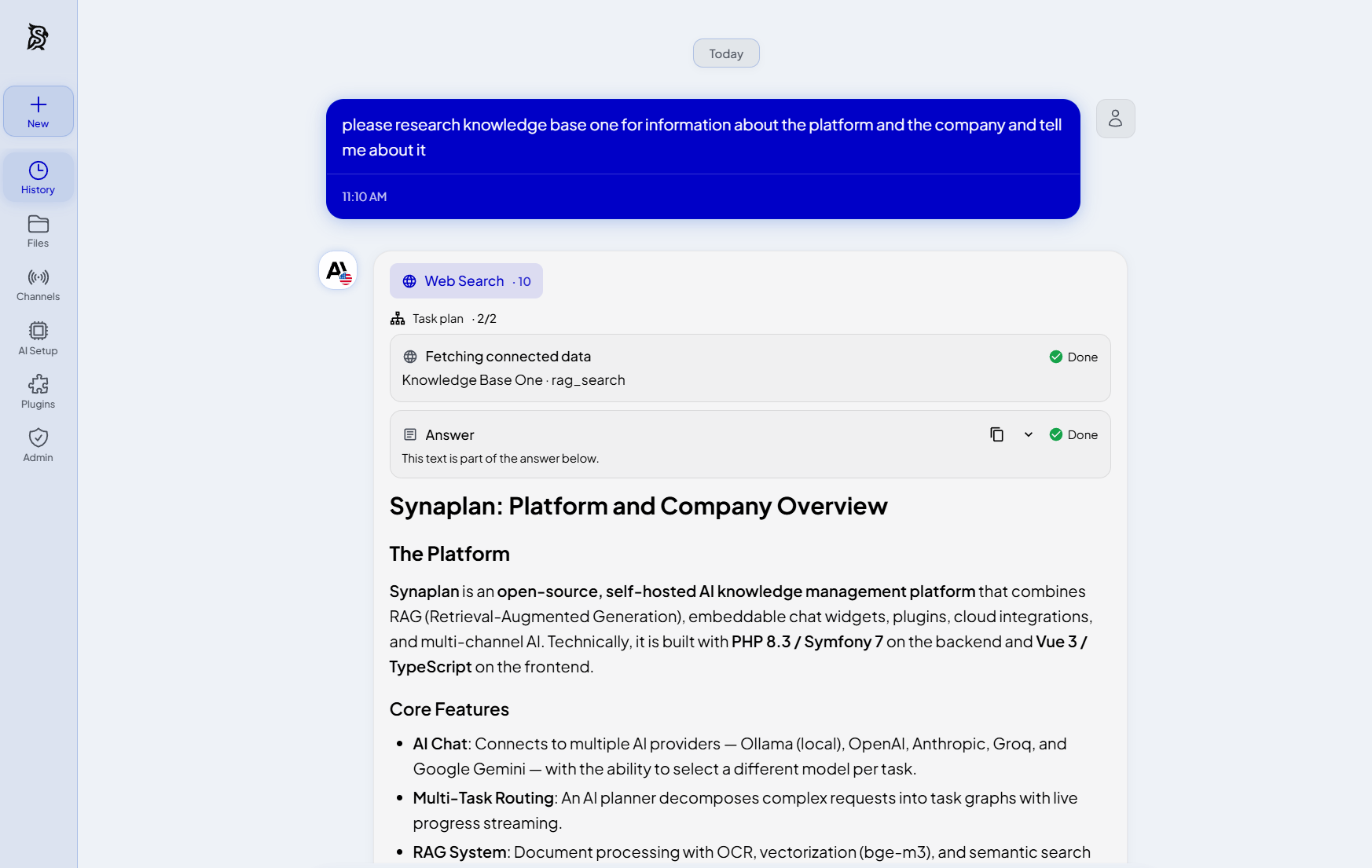
Please research Knowledge Base One for information about the platform and the company and tell me about it.
The planner recognizes the intent, plans an MCP fetch step against the "Knowledge Base One" server, runs the search there, and hands the retrieved text to the answering step as context. The model then answers grounded in your live data – not in whatever it happens to remember from training. And you watch each step as its own task card, ticking from running to done.
Compared with a tool-calling loop in the middle of a conversation, planning the calls upfront has tangible advantages: the plan is validated before it runs (a directed acyclic graph – no infinite loops), every step is visible and auditable, and a failing MCP call doesn't sink the whole answer – the rest of the plan still delivers what it can.
Free MCP server included
Here's the part that makes the loop especially satisfying: every Synaplan is also an MCP server – the free cloud accounts on web.synaplan.com just like every self-hosted install. Point Claude Desktop, Cursor, or any MCP host at your /mcp endpoint with an API key, and your workspace becomes a set of tools: the full AI chat pipeline, knowledge-base search, memories, file ingestion and more – nine tools at launch.
And because both sides speak the same protocol, you can even connect one Synaplan workspace to another as a data source – which is exactly what the demo does: "Knowledge Base One" is simply a second Synaplan workspace acting as a knowledge base.
All of it is open source under Apache 2.0, in the same GitHub repository as the rest of the platform. No paid tier, no separate module.
Guardrails – your data deserves them
Giving an AI access to internal systems demands care, so the first version is deliberately conservative:
- Read-only. Tools that declare themselves destructive or not purely read-only are refused. The assistant fetches data – it doesn't write into your CRM.
- Per-task opt-in, with an optional allowlist of which servers a task may use.
- Encrypted credentials at rest; tokens are never sent back to the browser.
- Network protections: HTTPS only, SSRF guards against internal targets, no redirects, strict timeouts and response-size limits.
- Isolated failures: a slow or broken server skips its step instead of blocking the answer.
Try it
- Watch the one-minute demo.
- Read the docs: MCP server & client and how DAG routing works.
- Self-host it: github.com/metadist/synaplan –
docker compose up -dand you're running. - Or start for free at web.synaplan.com and add your first MCP server under Channels → MCP Servers.
The feature is in early access – details may still evolve – but it already changes what a single prompt can do: it recognizes your intent, gathers the information and tools it needs from your systems first, and then answers. That's what "enriched prompts" should mean.