Vibe a Website with AI: How We Run synaplan.com on Rules Instead of Tickets
What you are reading right now was vibe-coded into existence. The article was drafted by an AI agent. The editor it was typed into was scaffolded by another agent. The Next.js website it lives on is maintained the same way — every working day.
We get one question more than any other from teams looking at our open-source AI platform: "Can AI really build a real website? Not a one-pager from a prompt — a real, multilingual, SEO-optimized, production site that you actually update every week?"
Short answer: yes, but not the way the screenshots on X make it look. The trick is not the model. The trick is the rules you keep next to the code.
What "vibe coding" actually means at Synaplan
"Vibe coding" sounds like permission to skip discipline. In practice the opposite is true. Without rules, an AI agent will happily rewrite your design system, swap your i18n library, and reinvent your auth on a Friday afternoon.
Our setup is boring on purpose:
- One
AGENTS.mdper repo. It is the project's constitution: the stack, the file structure, the conventions, the things never to touch. - A coding agent (Cursor + Claude / Codex) that reads
AGENTS.mdbefore every change. - A human review on every pull request, plus CI that runs lint, type-check, and Vitest.
That is it. No prompt-engineering rituals, no agent swarms. The agent vibes inside the lines we drew.
Here is the actual top of AGENTS.md for this website:
# This is NOT the Next.js you know

This version has breaking changes — APIs, conventions, and file structure
may all differ from your training data. Read the relevant guide in
`node_modules/next/dist/docs/` before writing any code.
That single paragraph saves hours per week. Without it, every fresh agent session would happily generate Next.js 13 patterns into our Next.js 16 codebase.
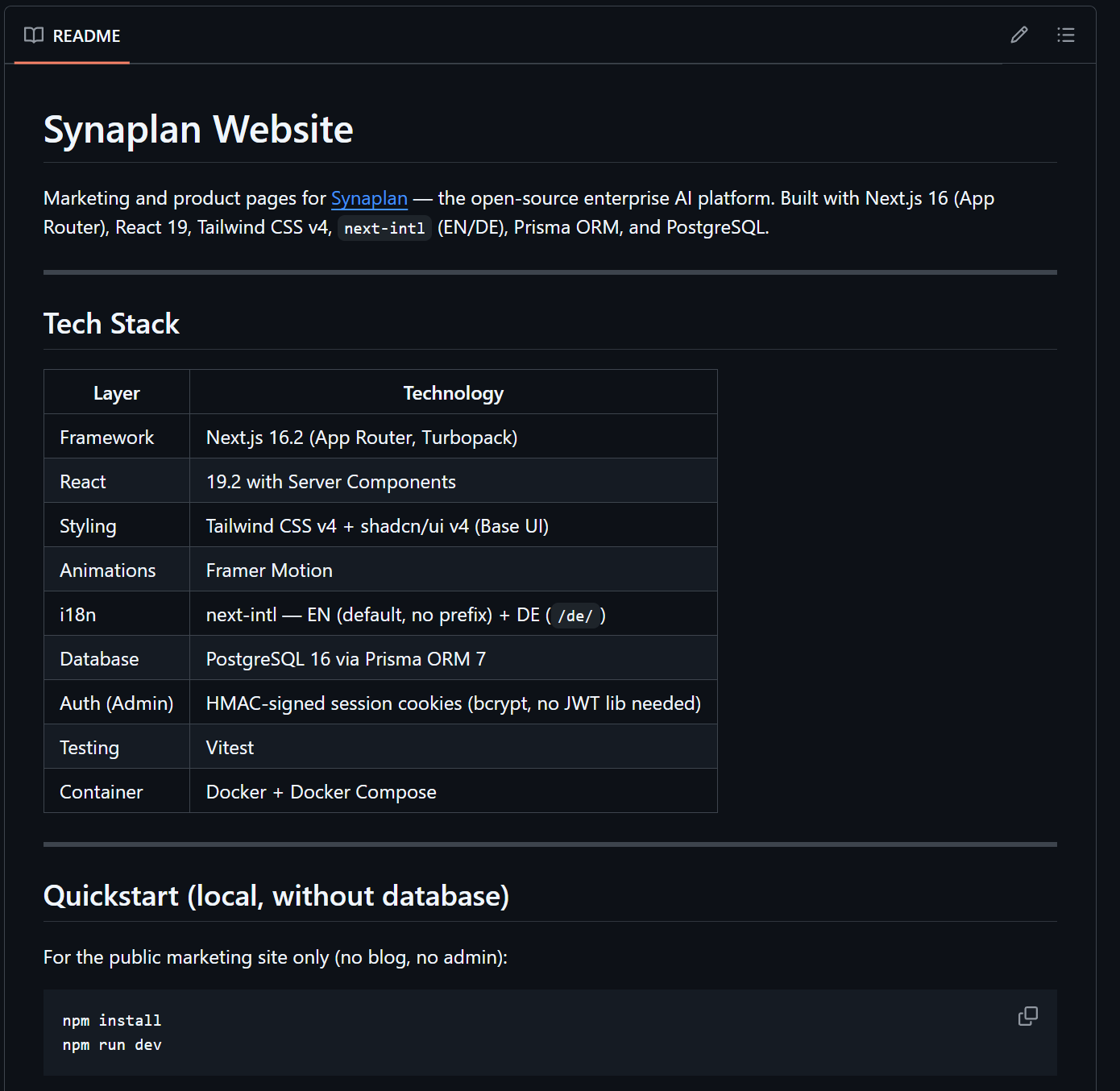
The website on GitHub
metadist/synaplan-website is the entire marketing site, blog, and admin CMS — open source, fork it if you want.
| Layer | Technology |
|---|---|
| Framework | Next.js 16.2 (App Router, Turbopack) |
| React | 19.2 with Server Components |
| Styling | Tailwind CSS v4 + shadcn/ui v4 (Base UI) |
| Animations | Framer Motion |
| i18n | next-intl — EN (default) + DE (/de/) |
| Database | PostgreSQL 16 via Prisma ORM 7 |
| Auth (Admin) | HMAC-signed session cookies (no JWT lib) |
| Testing | Vitest |
| Container | Docker + Docker Compose |
Marketing pages render as static HTML at build time. The blog and /admin are server-rendered against Postgres. The middleware (proxy.ts, not middleware.ts — that changed in Next 16) chains an admin guard with next-intl routing. Two locales, EN at the root and DE under /de/, share the same components.
The blog and admin you are looking at
Once we had the marketing site running, we needed a place to write. The options were obvious: Sanity, Contentful, Ghost, Strapi, a markdown folder. We picked the boring fifth option — and then asked: what if the agent that writes our code can also write our drafts?
So we built a small CMS into the site itself:
/admin— protected by HMAC-signed session cookies, no JWT library required.- A Markdown editor with live preview, auto-slug, tags, and cover image upload.
- An "AI Write" panel that streams from the Synaplan API. Modes: full post, outline, continue, rewrite, improve, translate.
- One
Postrow per language, joined by atranslationKeyso every German post can have an English twin.
The translate mode is the one we use the most. Write a post in German, click Translate → English, review, publish both. The article you are reading went through that pipeline twice — German first, English second, both reviewed by a human, both saved as Markdown in Postgres.
// Per-locale state in the editor
// (real code from src/components/admin/post-editor.tsx)
const [localeData, setLocaleData] = useState<Record<string, LocaleData>>({
  [primaryLocale]:   makeDefaultLocaleData(primaryLocale, initial),
  [secondaryLocale]: makeDefaultLocaleData(secondaryLocale, initial),
})
Public posts ship with BlogPosting JSON-LD for SEO, view counts, and a /de/blog mirror. The same Postgres row drives both the human-readable post and the machine-readable structured data — no duplicated copy, no third-party CMS in the loop.
Why we open-sourced the whole site
Three reasons, in order of importance:
- You should not buy an open-source AI platform from a company whose marketing site is a black box. If we hide our own stack, why would you trust ours?
- It is the most honest demo of Synaplan we can publish. The "AI Write" panel calls the same API any of our customers can use. The streaming behavior, the model routing, the auth — all of it is the public product, eating its own dog food.
- Forks are good. If you want a Next.js 16 + Prisma 7 starter with a tiny Markdown CMS and bilingual SEO baked in, the repo is yours.
Lessons from a year of vibing
A few things we learned the hard way:
AGENTS.mdbeats prompts. A 50-line file checked into the repo outperforms any clever system prompt. Agents change models; the file stays.- CI is the seatbelt. Lint, types, Vitest — all run on every pull request. The agent is fast; CI is the brake.
- Keep the surface small. One language, one framework version, one styling system. Every option you give the agent doubles the failure modes.
- Humans on every PR. The agent is a fast junior with infinite patience. It still needs a senior to nod yes.
Try it yourself
Clone the website repo, point it at a free Synaplan token, and you have a complete vibe-coded marketing site running locally in about ten minutes:
git clone https://github.com/metadist/synaplan-website
cd synaplan-website
cp .env.example .env.local
docker compose up -d
Or just start a free Synaplan account and plug the same API into your own AGENTS.md flow. Either way, the next blog post you read here will probably have been vibe-coded too — and that is exactly the point.